
Transcription
Convert speech to text using whisper.cpp, optimized for Apple Silicon.
What It Does
The Transcribe stage is the core of Shuole's pipeline. It processes your audio file and generates a text transcript with timestamps. This stage runs locally on your Mac using whisper.cpp, ensuring your audio never leaves your device.
Note: The transcription model (~1.0 GB) is downloaded automatically when you start your first transcription job.
Configuration Options
Default settings work for most cases. Click the Advanced button to reveal additional options.
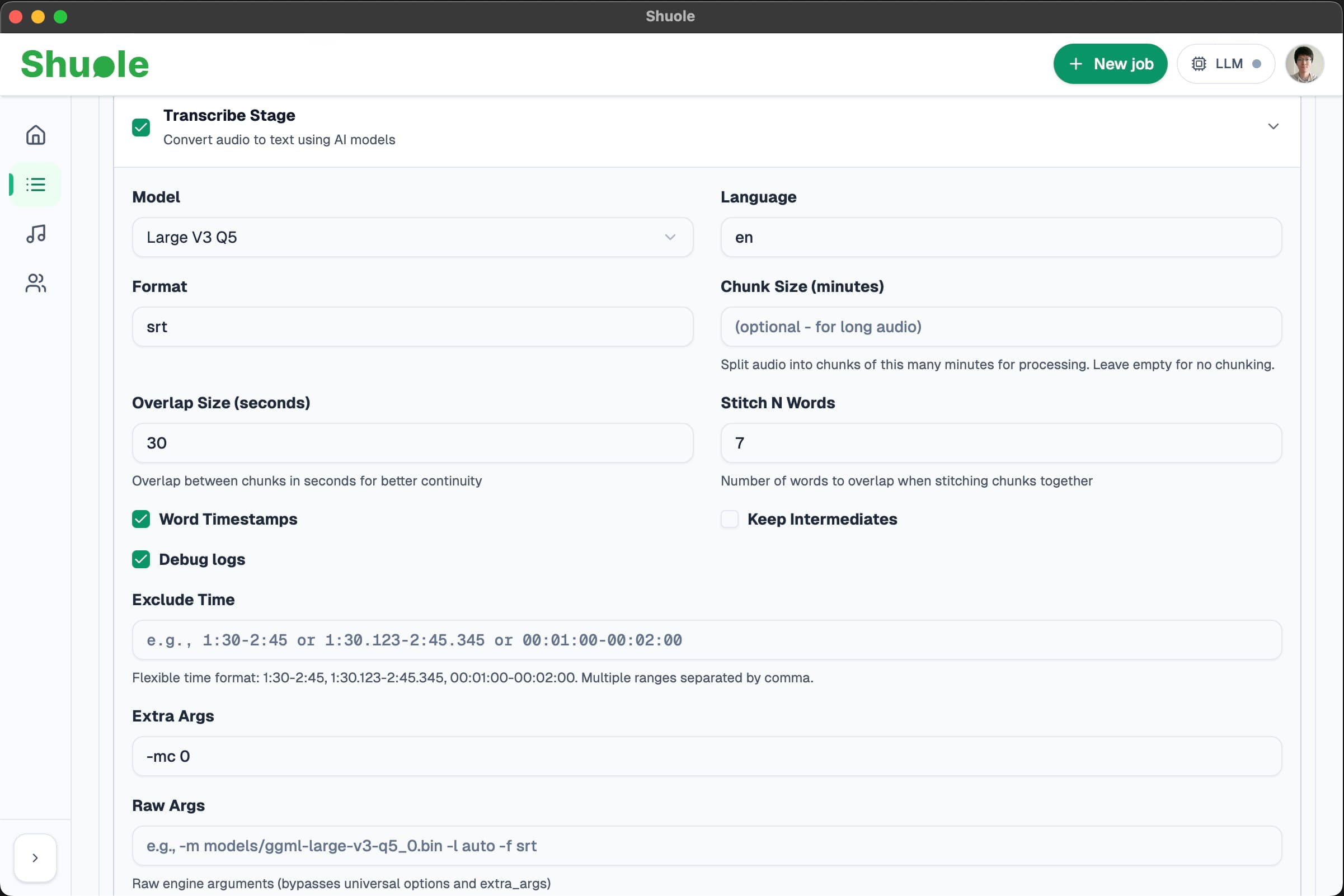
Default Options
Model
Shuole uses the Large V3 Q5 model by default — a quantized version of OpenAI's Whisper Large V3. This model offers the best balance of accuracy and performance based on our testing.
Note: The default model is not recommended to change unless you have specific requirements.
Language
Default: en (English). We recommend manually selecting English or Chinese for best results. While whisper.cpp supports many other languages, they have not been extensively tested with Shuole.
- English (en) — Fully tested and optimized
- Chinese (zh) — Fully tested and optimized
- Other languages — Supported by whisper.cpp but not tested; results may vary
Advanced Options
Format
Output format for internal processing. Default: srt. This is used internally and should not be changed.
Chunk Size (Optional)
For long audio files, you can optionally split the audio into chunks for processing. Leave empty for most cases.
When to use chunking:
- Audio longer than 1 hour with simple settings (clean background, fewer than 5 speakers)
- Audio longer than 30 minutes with complex settings (background noise, many speakers, or full pipeline with align/diarize)
Tip: When chunking, use 10-20 minute chunks. Chunking may slightly affect accuracy at chunk boundaries.
Overlap Size
Overlap between chunks in seconds for better continuity when using chunking. Default: 30 seconds.
Stitch N Words
Number of consecutive words to use for matching when stitching subtitle chunks together. Default: 7 words.
Word Timestamps
Enabled by default. Enable word-level timestamps to get timing for each word from whisper.cpp. This is useful for basic word-level output, but for more accurate word boundaries, use the Align stage instead.
Keep Intermediates
Disabled by default. Preserve intermediate files for debugging purposes.
Debug logs
Enabled by default. Enable verbose logging for troubleshooting.
Exclude Time
Time ranges to skip during transcription. You can enter ranges manually (e.g., 1:30-2:45) or use the shared exclusion block. See Timeline Exclusions for details.
Extra Args
Additional arguments passed directly to whisper.cpp. Default: -mc 0. Advanced users can modify this for fine-tuning behavior not exposed in the UI.
Raw Args
Raw engine arguments that bypass all other options including Extra Args. Use with caution.
Output
The transcription result is stored internally and displayed on the Results page. To export your transcript as SRT or JSON, see Export in Quick Start.
Related
- Word-Level Alignment — Refine timestamps for click-to-seek
- LLM Polish — Add punctuation with AI
- Speaker Diarization — Identify who said what